Welcome ,
  1. Home
  2. Database Tables

PageCarton Documentation


Interested in coding widgets, classes, or methods? Check out the Code section!

Database Tables

Database Tables are similar to Widgets, only that they don’t output anything. They also extends PageCarton_Table core PageCarton class. They are meant to guide the PageCarton core as to how to store data on the server.


Image

When building a plugin, a lot of times we want to store data for various purposes. Database is the heart of building a dynamic application where data is being manipulated based on user action. Data could be stored, retrieved and manipulated through a central storage system powered by PageCarton Database Tables.

Creating a Database Table

The process of creating Database Tables is similar albeit a lot easier than widgets.  

PageCarton Admin Panel > Plugins > My Plugins > "New DB Table"
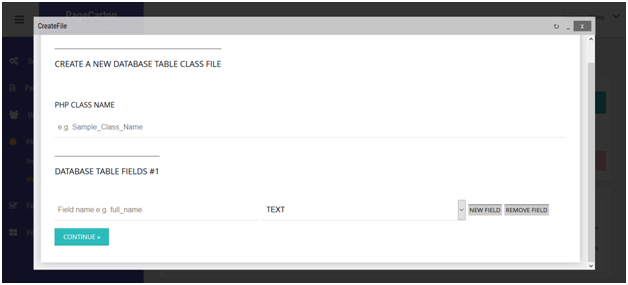
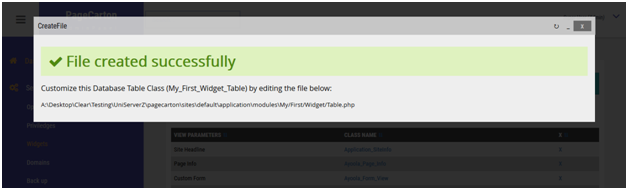
Unlike the widget, customizing the Database Table after creation is not required. After entering the class name and database fields, and data types, the Class file is created automatically and the Database tables can be used immediately. Database Tables are mostly used in Widgets through API calls.

Database Table APIs

In other to demonstrate the usage of the Database Table APIs, we will be using a hypothetical table with class name 'My_First_Widget_Table'. It stores user comments using field names 'first_name', 'email_address' and 'comment'. All the field names have 'TEXT' datatypes. Usage of some of the APIs are illustrated below:

Instantiating the Database Table

$table = new My_First_Widget_Table();

Writing to Database

$record1 = array(  'first_name' =>  'John', 'email_address' =>  'john@example.com',  'comment' =>  'This site is cool' );
$table->insert( $record1 );
$record2 = array(  'first_name' =>  'Ade', 'email_address' =>  'ade@example.com',  'comment' =>  'Nice and smooth' );
$table->insert( $record2 );

Retrieving Data from Table

//	Seek rows for comments by "John"
$where = array(  'first_name' =>  'John' );	
$rows = $table->select( null, $where );
var_dump( $rows );
//	outputs array( 0 => array(  'first_name' =>  'John', 'email_address' =>  'john@example.com',  'comment' =>  'This site is cool' ) );

Update Records

$table->update( $newRecordValues, $where );

Delete Records

$table->delete( $where );


← Previous "Building Plugins for PageCarton""PageCarton Features" Next →


Similar Documentation Article


How to Backup and Restore on PageCarton Photo

How to Backup and Restore on PageCarton

Backing up your PageCarton website helps protect your data against mistakes, server issues, hacking, or accidental deletion. A proper backup allows you to restore your website quickly if anything g...

article


Multi-Site Manager on PageCarton Photo

Multi-Site Manager on PageCarton

The Multi-Site Manager in PageCarton allows you to manage multiple websites from a single PageCarton installation. With the Multi-Site Manager, each site can have its theme, content, and setting...

article


How to Create a Form on PageCarton Photo

How to Create a Form on PageCarton

Forms on PageCarton allow you to collect information from website visitors, such as contact details, inquiries, or feedback. Follow the steps below to create a form on your PageCarton website. S...

article


Creating of Pages on PageCarton Photo

Creating of Pages on PageCarton

Step 1: Log in to the PageCarton Admin Panel 1.     Open your browser. 2.     Visit https://yourdomain.com/pc-admin (For local installation: http://lo...

article


How to add posts on PageCarton Photo

How to add posts on PageCarton

PageCarton makes it easy to create and publish posts such as blog articles, news updates, or announcements on your website. Follow the simple steps below to add a post successfully. Step 1: Log ...

article


How to Use Access Level Widgets to Control Content Visibility in PageCarton Photo

How to Use Access Level Widgets to Control Content Visibility in PageCarton

This article explains how to use PageCarton's Access Level Widgets to control content visibility based on user roles, such as content owners, invited users, or administrators. It helps ensure t...

article